Visual Design
Visual Hierarchy
Visual hierarchy organizes page elements to establish an intentional path for the reader's eye to follow. Controlling the scale, thickness, and positioning of content forces critical information to stand out while sub-topics naturally recede.
Size
The human eye is naturally drawn to the largest element on a page first. Making main headings significantly larger than body text establishes an instant visual entry point. This drastic scale difference guides the reader's eye and dictates the exact order in which information should be processed.
Weight
Typographic weight refers to the physical thickness of a font. Using bold, heavy weights for headlines or critical warning metrics makes them pop out instantly against regular body text. This dramatic thickness shift creates strong visual contrast and highlights key terms without changing the font size.
Placement
The specific location of an item on a layout directly determines its perceived importance. Placing key data at the top-left area ensures Western readers notice it immediately because it aligns with standard reading patterns. Lower-priority links or secondary details belong in the lower regions of the canvas.
Contrast
Contrast rules prevent visual components from blending together into a gray, unreadable mess. Information designers use distinct shifts in color, scale, and shape to create separation between competing elements. High figure-ground contrast remains the core requirement for digital readability and visual accessibility.
Color Contrast
High tonal variance is vital for basic readability and digital accessibility. Pairing a dark font with a light background ensures text characters stand out cleanly and significantly reduces eye strain. Designers apply color theory by selecting opposing pairs on the color wheel to ensure that legibility remains completely uncompromised.
Highlighting and Isolation
Intentionally altering a single visual attribute establishes a clear focal point, ensuring users notice that specific element first. Making one critical warning button bright red in a row of gray links forces immediate visual isolation and dictates where the eye should land. Designers manipulate shape, scale, color, typeface, or position to trigger this instinctual human response and guide user attention effortlessly.
Whitespace and Balance
Effective page composition requires managing the empty areas of a canvas as a deliberate design element. Balancing positive objects with negative space shapes how comfortably a user reads and scans text. Proper spacing rules remove clutter and create an organized visual environment.
Negative Space
Negative space functions as a layout tool to regulate the proximity of design elements and draw attention to important headings or graphics. While traditional print layouts rely on specific margin-to-gutter proportions, modern digital design uses flexible, uniform grids where margins and gutters scale dynamically for responsive screens. Implementing these consistent spacing rules removes layout clutter, provides a clear frame, and creates a highly organized visual environment.
Grid Alignment
Grid alignment organizes elements along an underlying framework of lines to create a unified system, using structural axes like a mid-line to anchor core content and establish visual balance. This layout arrangement relies on an optimal line length of 7 to 12 words per line to determine the ideal column spans. Designing a successful grid requires balancing internal content pressures with the external size constraints of the physical format.
Gestalt Principles
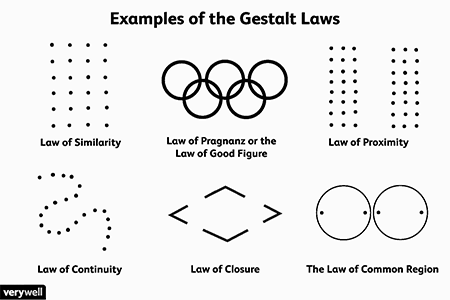
Visual layout systems rely on how the human mind naturally organizes and groups separate design elements. Information designers use spatial arrangements and structural boundaries to echo the logical relationships within a document. Understanding these grouping behaviors allows authors to reduce cognitive effort and guide readers through a page intuitively.
Proximity
The brain assumes that items placed close together belong to the same logical group, while items separated by whitespace are unrelated. Document design utilizes relative rather than absolute spacing to show relationships of belonging. For example, designers place headings closer to the text they introduce than to the section they follow to visually group them together.
Similarity
The mind naturally groups elements that share identical visual features, like color, shape, size, or font style. Layout execution takes advantage of this behavior by applying uniform styling to items that perform the same role. For example, formatting all hyperlinks in a single distinctive color, or using a consistent font for subheadings, allows readers to instantly recognize their shared logical function.
Continuity
The human eye naturally follows an unbroken line, smooth curve, or implied linear path. For example, bulleted lists align each feature on a shared vertical baseline, which emphasizes that all items are parallel. This consistent arrangement creates a predictable visual track that significantly increases readability, scanning, and skimming speeds.
Closure
The mind automatically fills in missing visual gaps to perceive a complete shape or structured boundary. This instinct allows information designers to use clean, minimalist layouts that enclose content using negative space instead of physical lines. Relying on implied closure makes pages look more open, modern, and less confusing to navigate.
Order (Pragnanz)
Humans naturally prefer symmetrical, simple, and stable arrangements because they require less cognitive effort to process. Layout execution takes advantage of standard reading behaviors by placing the most important information at the top and the left margin. Organizing elements into a clean, predictable framework creates a reliable structure that users can navigate effortlessly.
Enclosure (Common Region)
Drawing a physical border, card, or shaded background around a group of elements forces the brain to see them as a single, unified category. Positive enclosure uses explicit elements like lines or background rules to instantly distinguish a grid field from its surroundings. This structural separation is highly powerful because it completely overrides standard proximity groupings on a page.
Color and Color Theory
Color serves as a critical visual cue that instantly captures attention and groups related details. Designers rely on chromatic systems to establish mood, convey structural status, and direct readers toward specific actions. Proper execution balances aesthetic harmony with technical readability to ensure a layout remains highly functional for all audiences.
Functional Color Coding
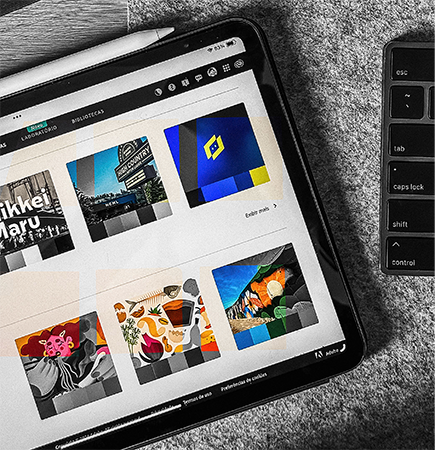
Color can act as a purposeful tool to convey immediate meaning rather than serving as basic decoration. Assigning specific hues to data categories help users process technical updates instantly without reading wordy explanations. One example of this approach maps red to errors, yellow to warnings, and green to successful operations.
Color Harmony and Schemes
Designers utilize the color wheel to select predictable, pleasing combinations that do not cause visual fatigue. Restraining a design to a selective palette keeps complex documents or UI layouts looking highly professional and organized. Best practices recommend pairing a dominant neutral backdrop with a single, vibrant accent tone to direct the reader's eye efficiently. Additional technical guidance, such as the Figma Color Theory Reference, outlines further strategies for balancing digital canvas palettes.
Accessibility and Contrast
Tonal selections must account for human viewing limitations such as color blindness and low-vision conditions. Information designers ensure that critical data is never communicated solely through color differences to protect total digital accessibility. Coupling raw color codes with distinct text labels or unique icons guarantees that every viewer can process the layout flawlessly.
Unity
Unity represents the primary goal of a composition where all elements look like they belong together in a single system. Effective layout execution ensures that the whole design predominates over its individual parts to prevent confusion. Achieving unity balances structured consistency with subtle interest to create an environment that functions as a seamless communication tool.
Repetition
Reusing consistent design elements binds separate web pages into a single, recognizable system. Repeating the same font families, icons, and core colors across every layout establishes a predictable pattern that helps users navigate effortlessly. For example, this page's audio module mirrors the homepage styling to reinforce absolute system continuity.
Variety
Subtle variety prevents a layout from looking monotonous or visually stale while underlying consistency remains critical. Introducing an unexpected color accent or a unique chart shape catches the reader's eye at crucial moments. This technique creates a dynamic rhythm that keeps viewers engaged without causing chaos or breaking page discipline.