Information Design
Audience Analysis
Purpose
Before typing a single word, an information designer must define the primary goal of the document. Clarifying whether the asset is meant to instruct, inform, warn, or persuade ensures that no unnecessary or distracting details are included.
| Goal | Example |
|---|---|
| Read to perform a task | User or instructional manuals. |
| Read to understand and execute | Technical troubleshooting guides. |
| Read to learn | Research reports or articles. |
| Read to assess and take action | Business or analysis reports. |
How users interact with documents
People rarely read modern documentation cover-to-cover. A designer must analyze whether a user will scan text on a smartphone while walking, reference a printed copy in a noisy factory, or study data on a desktop monitor.
Ultimately, the layout must match the user's environment and accommodate one of the five primary reading strategies:
- Skimming
- Scanning
- Searching
- Receptive reading
- Critical reading
Cultural Context
Visuals, symbols, and text phrasing must respect the cultural background and reading habits of the intended users. Designing with clear, universal layouts prevents misinterpretation across diverse language groups. Thoughtful integration of shared visual conventions and the audience's visual culture allows designers to effectively implement global and local designs.
Organizational Patterns
Content must follow a predictable sequence to guide the reader's eye effectively. Choosing a logical framework allows information designers to arrange technical data in a format that mirrors a user's natural thought process. Aligning layouts with standard documentation structures removes visual confusion and speeds up comprehension.
Six common organizational frameworks include:
- Chronological
- Arranges details in a step-by-step timeline or sequence. This framework is highly effective for instruction manuals and project schedules.
- Spatial
- Organizes elements by physical location or structural setup, such as top-to-bottom or east-to-west. Geographic maps, assembly diagrams, and architectural blueprints typically rely on this layout.
- General to Specific
- Starts with a broad, easily understood summary before diving into granular, supporting technical details. Reports and organizational policies often use this method.
- More Important to Less Important
- Places the most critical details at the very beginning of the layout. This hierarchy ensures readers capture the bottom line even if they stop reading early, making it ideal for feasibility studies and presentations.
- Comparison and Contrast
- Organizes data side-by-side to highlight distinct similarities and differences between items. Product comparison web pages are a common example of this framework.
- Classification and Partition
- Groups a larger dataset into discrete categories or breaks a whole unit down into its individual components. Datasheets and installation guides use this structural setup quite often.
Typography and Layout
The interplay between spatial layout and typography represents the primary visual delivery system for text-based information. Spatial positioning controls how content is displayed, while the chosen typefaces form the physical characters of the words.
High figure-ground contrast remains the core requirement for readability.

Typography
Selecting a typeface directly shapes usability, comprehension, and user expectations. Serifs like Garamond project institutional authority, while sans-serifs like Arial offer modern neutrality. Designers prioritize specific structural traits like a tall x-height and open letterforms to optimize for digital screens.
Print Layouts
Designing physical documents requires careful control over fixed margins, typographic scales, and paper mediums. Layout execution adapts to the user's specific workplace environment and physical medium to maximize reading comfort. Line lengths and line spacing shift dynamically based on the shape and size of the printed canvas.
Web Layouts
Screen-based interfaces must be flexible and responsive so text automatically adapts to monitors, tablets, and mobile devices. Modern web layouts require dynamic spacing constraints to combat visual fatigue. Managing glare and providing reliable accessibility features are critical for high-resolution viewing.
Information Chunking
Information chunking breaks down cluttered and unstructured data into highly scannable, organized structures. It uses visual hierarchy to communicate technical data with maximum efficiency and precision.
Headings and Subheadings
These visual cues serve as clear labels for each distinct section. Descriptive titles allow users to scan a page quickly and locate specific answers without reading the entire document. Headings and subheadings act as vital signposts to enable scannability and effectively guide readers.
Paragraphs
These standard text blocks work best for cohesive explanations, summaries, or introductions. They include body and transitional paragraphs, which usually begin with a topic sentence and follow with supporting information. Designers use them to introduce a concept, discuss an idea, or connect a few related thoughts into a short overview, keeping blocks limited to four or five sentences.

Paragraph Lists
These larger blocks work best when a complex topic contains several sub-categories that each require a detailed explanation. This method breaks lengthy content into digestible chunks by using visual lead-ins for each paragraph.
Sentence Lists
These vertical arrangements pull detailed items out of text-heavy blocks to instantly increase readability. Short fragments work best for quick visual scanning of brief traits or features, such as a fast checklist for a shipping box. Complete, single sentences are ideal when each standalone point requires its own independent context, like a list of separate safety warnings. Lists with more than ten items should be broken up into smaller groups.
Readability
Readability measures how easily a person can process, understand, and retain written text. Effective design balances layouts with clear textual guidelines to help users find information quickly. Simple language choices combine with structured formatting to create an accessible user experience.
Scannability
Web users and print readers browse pages by skipping around to search for specific words rather than reading word-for-word. Digital layouts leverage screen patterns like F-shaped paths and clear hyperlinks to guide online viewers. Physical documents utilize running headers and margin callouts to make printed reports instantly skimmable.
Plain Language
Information design relies heavily on short sentences, common vocabulary, and an active voice. Avoiding technical jargon reduces a user's cognitive load and significantly speeds up comprehension. Clear messaging ensures that important data remains easy to parse under any circumstances.
Reading Indices
These mathematical formulas calculate the grade level of a text based on sentence lengths and syllable counts. Popular evaluation tools like the Gunning Fog Index help authors measure the complexity of their writing. Designers target accessible reading levels to ensure their information remains open to the widest possible audience.
Graphics
Visual elements allow readers to process complex statistics and data relationships almost instantly. Strategic design choices transform raw numbers into clear graphical stories that support analytical thinking. Information designers choose the appropriate graphics to ensure valuable data is communicated clearly, objectively, and efficiently.

Graphic Types
Functional illustrations must serve a clear purpose, remain simple, and use strong contrast. Data tables show precise numbers, charts plot trends, and diagrams illustrate spatial characteristics like maps. Formats like infographics present data far more efficiently than text alone.
The Data-Ink Ratio
Introduced by theorist Edward Tufte, this concept states that most pixels on a screen should display actual data. Designers should remove all non-functional decoration, heavy borders, and distracting grids. Clean layouts ensure that decorative elements do not compete with the core message.
Graphical Integrity
Tufte's principles of graphical integrity dictate that visual statistics must tell the complete truth to protect information credibility. Charts must never distort scales, omit baseline data, or use misleading visuals to manipulate user perception. Honest representations build trust and help readers make informed decisions.
Data Density
Also popularized by Tufte, this concept measures how much factual information is packed into a specific graphical area. High-quality information design maintains a high data density without cluttering the screen. Good layout execution balances rich data with clear spacing to avoid overwhelming the reader.
Human Factors
Human factors focus on how the human body and mind interact with visual arrangements. Designers evaluate physical environments, viewing constraints, and behaviors to eliminate friction and prevent cognitive overload. Designing with user limitations in mind ensures that information remains accessible in everyday situations.

Physical Conditions
Designers must account for the physical environment where a person accesses a document or interface. External factors like screen glare, distance from a sign, harsh industrial settings, or reading text inside a moving vehicle drastically alter layout needs. Adjusting color palettes, luminance levels, contrast, and text sizes helps combat these unpredictable real-world distractions.
Medium Constraints
The choice between digital screens, large-format signs, or handheld booklets changes the baseline rules of text scaling. Each display type requires a unique layout structure to accommodate how a person physically holds or views the canvas. Selecting the correct presentation method ensures comfortable viewing from any logical distance.
Usability Testing
Observing real users as they interact with a draft layout helps designers pinpoint unexpected areas of confusion. Testing reveals exactly where an arrangement fails so the document can be refined for maximum clarity. Gathering authentic audience feedback removes guesswork from the information design process.
Technical Communication
Technical communication transforms complex corporate, medical, or engineering data into functional everyday assets. This field uses structured templates to deliver precise instructions, research findings, and organizational policies to specific audiences. Choosing the correct document type helps users locate answers and make informed decisions quickly.
Reports
These multi-page documents use systematic layouts to make dense organizational or research data easily skimmable. They rely on strong headers, tables of contents, and brief executive summaries to guide professional decision-makers. Clear formatting allows readers to extract high-level conclusions without reading every page line-by-line.
Manuals and Datasheets
These are functional resources that guide users through how-to operations or provide quick access to product specifications. They feature explicit step-by-step instructions, troubleshooting grids, and clear safety warnings to prevent operational errors. Prioritizing utility over decoration ensures user safety and technical accuracy.
Presentations
These visually driven slide decks use bold, simplified graphics and minimal text to support a live speaker. Effective structural design focuses on one core idea at a time to keep the audience engaged. Creating clean visuals prevents the screen from competing with the spoken delivery.
Infographics
These digital layouts merge short text explanations with clear charts and illustrations to tell a comprehensive data story. They capture user attention on web pages or print formats by turning abstract statistics into digestible visual narratives. Incorporating clear callouts makes these graphics highly effective for broad public education.
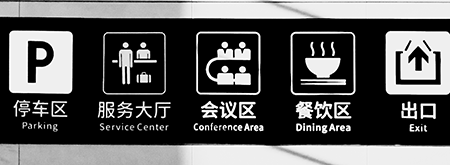
Wayfinding and Signage
This physical application of information design helps people safely navigate complex public environments like hospitals, convention centers, and airports. It relies on universal visual symbols, consistent color codes, and clear directional arrows to guide human traffic. Strategic placement ensures that users capture vital directions at crucial decision points.